kk logo

Spiel 67 aus der 200 Arduino Spiele Sammlung.
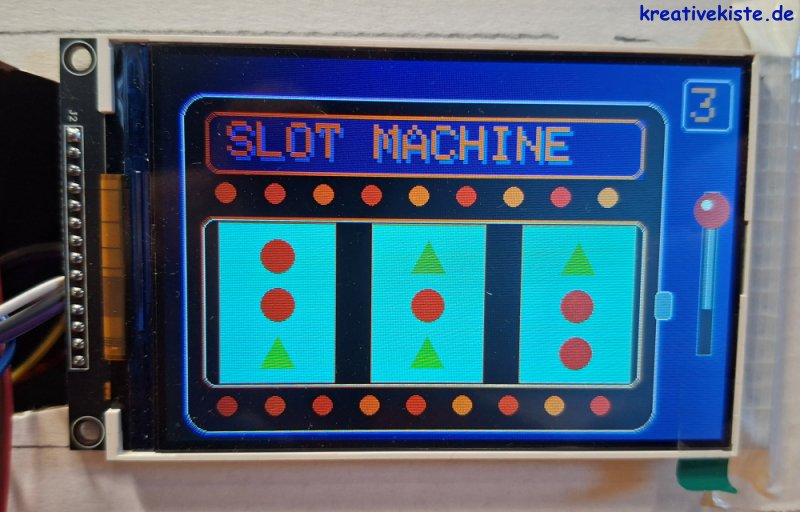
2 Arduino Neon Vegas Slot Maschine auf 4 TFT Display

1. Wie funktioniert eine Slot Machine?

Ursprünglich waren Slot Machines (auch „Einarmige Banditen“ genannt) rein mechanische Wunderwerke aus Zahnrädern, Hebeln und Federn. Wenn man den Hebel zog, wurden drei Walzen in Schwingung versetzt, die durch mechanische Stopper zufällig anhielten.

In deiner digitalen Version übernimmt der Arduino die Rolle des Gehirns. Er nutzt einen Zufallsgenerator (random), um zu entscheiden, welche Symbole erscheinen. Anstatt echter Walzen „zeichnen“ wir die Symbole einfach so schnell hintereinander auf das 4" TFT Display, dass es für das Auge wie eine Drehbewegung aussieht.

2. Das Spielprinzip

Das Ziel ist simpel: Drei Symbole in einer Reihe.

  • Der Einsatz: Durch Drücken des Buttons (dein digitaler Hebel) startest du den Mechanismus.
  • Die Gewinnlinie: Nur die mittlere Reihe zählt. Dein Programm vergleicht die Symbole in dieser Zeile.
  • Die Auszahlung (Score):
    • 3 Punkte (Jackpot): Alle drei Symbole sind identisch (z.B. drei Sterne).
    • 2 Punkte (Kleiner Gewinn): Zwei Symbole sind gleich.
    • 1 Punkt (Niete): Alle Symbole sind verschieden.

3. Die Verdrahtung (Hardware)

Damit die Pixel tanzen, müssen Display und Button korrekt mit dem Arduino Uno verbunden sein. Hier ist dein Belegungsplan:

Komponente Pin am Display/Bauteil Pin am Arduino Uno
ILI9486 Display VCC 5V
GND GND
CS (Chip Select) Pin 10 (SS)
DC (Data/Command) Pin 8
RST (Reset) Pin 9
SDI (MOSI) Pin 11
SCK (Clock) Pin 13
Button Anschluss A Pin 5
Anschluss B GND


Hinweis: Da wir im Code nutzen, braucht dein Button keinen externen Widerstand. Er schaltet einfach Pin 5 direkt auf Masse (GND).
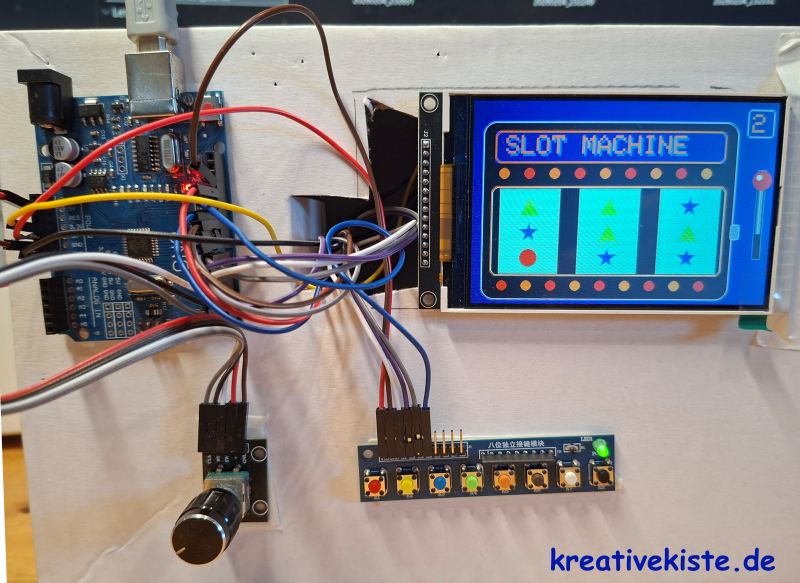
 

3 Arduino Neon Vegas Slot Maschine auf 4 TFT Display

4. So funktioniert das Programm

Dein Code ist in vier logische Bereiche unterteilt:

  1. Initialisierung: In setup() wird das Display „aufgeweckt“ und das aufwendige Neon-Gehäuse einmalig gezeichnet. Das spart Zeit, da wir während des Spiels nur die kleinen Fenster der Walzen aktualisieren müssen.
  2. Die Animation: Sobald du den Button drückst, spielt animateLeverDown() eine kleine Sequenz ab. Danach startet die rollSlots() Schleife. Damit es echt wirkt, haben wir ein „Ease-Out“ eingebaut: Die Drehgeschwindigkeit wird zum Ende hin immer langsamer (delay wird größer).
  3. Die Grafik-Engine: Anstatt Bilder zu laden, berechnet der Arduino jede Form (Dreieck, Kreis, Stern) mathematisch. Besonders der Stern ist ein kleiner Rechenkünstler, da er mit Sinus- und Cosinus-Werten positioniert wird.
  4. Die Logik-Prüfung: Nach dem Stoppen schaut die Funktion showScore() in das Array lastShapes[]. Dort sind die IDs (0, 1 oder 2) der mittleren Symbole gespeichert. Ein einfacher Vergleich (if) entscheidet dann über Sieg oder Niederlage.

💡 Profi-Tipp für das Gehäuse

Wenn du die Slot Machine in eine echte Box einbauen willst, schneide eine Öffnung für das Display aus und montiere den Button an der Seite oder oben auf der Box. Durch das Dunkelblau und die Neon-Farben sieht das Ganze besonders toll aus, wenn du es in ein dunkles Gehäuse setzt!

 5. 🎰Arduino Programm 

// kreativekiste.de
// 05.02.2026
// slot maschin

#include <SPI.h>
#include <ILI9486_SPI.h>

ILI9486_SPI tft(/*CS=10*/ SS, /*DC=*/ 8, /*RST=*/ 9);
#define BUTTON_PIN 5

#define BLACK 0x0000
#define WHITE 0xFFFF
#define BG_CYAN 0x07FF
#define DEEP_BLUE 0x0018
#define NEON_PINK 0xF81F
#define NEON_BLUE 0x04FF
#define GOLD 0xFDA0
#define ORANGE 0xFD20
#define BRIGHT_RED 0xF800
#define SILVER 0xC618
#define LIGHT_GREY 0xAD55

#define SYM_GREEN 0x07E0
#define SYM_RED 0xF800
#define SYM_BLUE 0x001F

int lastShapes[3];

void drawTriangleShape(int x, int y, uint16_t color) {
tft.fillTriangle(x, y - 15, x - 15, y + 13, x + 15, y + 13, color);
}

void drawCircleShape(int x, int y, uint16_t color) {
tft.fillCircle(x, y, 14, color);
}

void drawStarShape(int x, int y, uint16_t color) {
float radius = 15;
for (int i = 0; i < 5; i++) {
float angle = i * 2 * PI / 5 - PI / 2;
float nextAngle = (i + 2) * 2 * PI / 5 - PI / 2;
tft.fillTriangle(x, y, x + cos(angle) * radius, y + sin(angle) * radius,
x + cos(nextAngle) * radius, y + sin(nextAngle) * radius, color);
}
}

void drawRandomShape(int x, int y, int shapeID) {
tft.fillRect(x - 40, y - 20, 80, 40, BG_CYAN);
if (shapeID == 0) drawTriangleShape(x, y, SYM_GREEN);
else if (shapeID == 1) drawCircleShape(x, y, SYM_RED);
else if (shapeID == 2) drawStarShape(x, y, SYM_BLUE);
}

void drawNeonFrame(int x, int y, int w, int h, int r, uint16_t c1, uint16_t c2, uint16_t c3) {
tft.drawRoundRect(x, y, w, h, r, c1);
tft.drawRoundRect(x+1, y+1, w-2, h-2, r, c2);
tft.drawRoundRect(x+2, y+2, w-4, h-4, r, c3);
}

void drawBase() {
tft.fillScreen(DEEP_BLUE);
tft.fillRoundRect(15, 30, 405, 285, 20, BLACK);
drawNeonFrame(15, 30, 405, 285, 20, NEON_BLUE, NEON_PINK, WHITE);

tft.fillRect(35, 45, 365, 50, DEEP_BLUE);
drawNeonFrame(35, 45, 365, 50, 10, GOLD, ORANGE, GOLD);

tft.setCursor(55, 55); tft.setTextSize(4);
tft.setTextColor(NEON_BLUE); tft.print("SLOT MACHINE");
tft.setCursor(52, 52); tft.setTextColor(GOLD); tft.print("SLOT MACHINE");

for(int i=0; i<9; i++) {
tft.fillCircle(50 + (i*40), 110, 8, (i%2==0 ? ORANGE : BRIGHT_RED));
tft.fillCircle(50 + (i*40), 290, 8, (i%2==0 ? BRIGHT_RED : ORANGE));
}

drawNeonFrame(30, 130, 375, 145, 10, ORANGE, GOLD, WHITE);

int yWalze = 135; int hWalze = 135;
tft.fillRect(45, yWalze, 95, hWalze, BG_CYAN);
tft.drawRect(44, yWalze-1, 97, hWalze+2, GOLD);
tft.fillRect(172, yWalze, 95, hWalze, BG_CYAN);
tft.drawRect(171, yWalze-1, 97, hWalze+2, GOLD);
tft.fillRect(300, yWalze, 95, hWalze, BG_CYAN);
tft.drawRect(299, yWalze-1, 97, hWalze+2, GOLD);

drawLever(120);
}

void drawLever(int yKugel) {
int xHebel = 460;
tft.fillRect(425, 60, 55, 245, DEEP_BLUE);
tft.fillRect(xHebel - 6, 105, 12, 140, BLACK);
tft.drawRect(xHebel - 7, 104, 14, 142, SILVER);

int rodHeight = abs(yKugel - 200) + 5;
int rodTop = min(yKugel, 200);
tft.fillRect(xHebel - 4, rodTop, 8, rodHeight, LIGHT_GREY);
tft.drawFastVLine(xHebel - 1, rodTop, rodHeight, WHITE);
tft.drawFastVLine(xHebel + 2, rodTop, rodHeight, SILVER);

tft.fillCircle(xHebel, yKugel, 15, BRIGHT_RED);
tft.fillCircle(xHebel - 5, yKugel - 5, 4, WHITE);

tft.fillRoundRect(415, 190, 15, 25, 4, SILVER);
tft.drawRoundRect(415, 190, 15, 25, 4, WHITE);
}

void animateLeverDown() { for (int y = 120; y <= 240; y += 40) { drawLever(y); delay(15); } }
void animateLeverUp() { for (int y = 240; y >= 120; y -= 40) { drawLever(y); delay(15); } }

void rollSlots() {
int xCenters[] = {92, 219, 347};
int yTop = 162; int yMid = 203; int yBot = 244;
for (int col = 0; col < 3; col++) {
drawRandomShape(xCenters[col], yTop, random(0, 3));
drawRandomShape(xCenters[col], yBot, random(0, 3));
int shapeID = random(0, 3);
drawRandomShape(xCenters[col], yMid, shapeID);
lastShapes[col] = shapeID;
}
}

void showScore() {
int result = 1;
if (lastShapes[0] == lastShapes[1] && lastShapes[1] == lastShapes[2]) result = 3;
else if (lastShapes[0] == lastShapes[1] || lastShapes[1] == lastShapes[2] || lastShapes[0] == lastShapes[2]) result = 2;

tft.fillRect(430, 10, 45, 45, DEEP_BLUE);
drawNeonFrame(430, 10, 45, 45, 5, NEON_BLUE, NEON_PINK, WHITE);
tft.setCursor(438, 18); tft.setTextColor(GOLD); tft.setTextSize(4);
tft.print(result);
}

void setup() {
randomSeed(analogRead(0));
tft.setSpiKludge(false);
tft.init(); tft.setRotation(3);
drawBase();
pinMode(BUTTON_PIN, INPUT_PULLUP);
}

void loop() {
if (digitalRead(BUTTON_PIN) == LOW) {
tft.fillRect(430, 10, 45, 45, DEEP_BLUE);
drawNeonFrame(430, 10, 45, 45, 5, NEON_BLUE, NEON_PINK, WHITE);
animateLeverDown();
for (int r = 0; r < 12; r++) { rollSlots(); delay(20 + (r * 20)); }
showScore();
animateLeverUp();
delay(400);
}
}

Ronnie

schwäbischer tüftler und bastler, kraftsportler, neurodivers, 45 Jahre, 1 Frau, 5 Kinder und 1003 Ideen. 

1.2 ronnie berzins

Kontakt

visitenkarte